

Subscription revenue and realized LTV
Once you import subscription data from a payment provider, Usermaven turns it into recurring-revenue analytics you can trust and attribute: MRR, churn, expansion, and realized lifetime value. This article explains what those reports show and how to read them.
Prerequisites
Before you can see subscription revenue, you need:
A connected payment provider. Paddle is supported, including Paddle Classic, with subscription history backfilled automatically on connect.
Historical revenue data imported. If you connected recently, allow time for the backfill to complete before comparing totals.
Open the subscription revenue dashboard
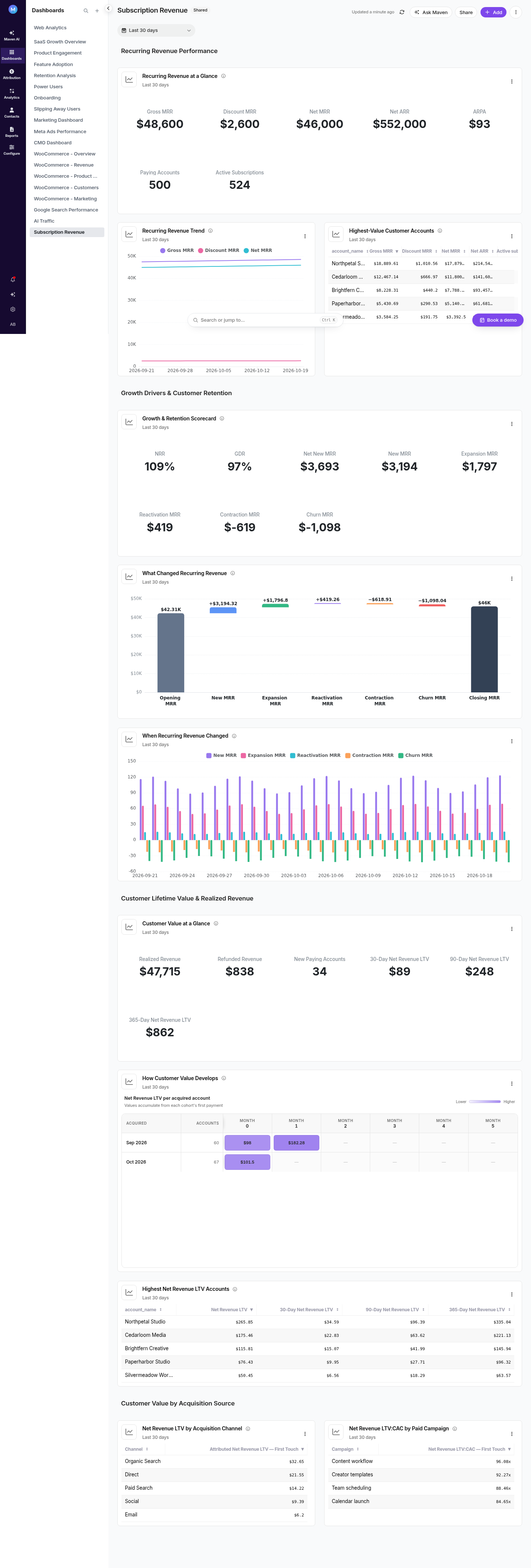
Go to Dashboards and open the certified Subscription revenue dashboard. It ships preconfigured so you don't have to assemble the tiles yourself.
What the dashboard shows
Recurring revenue trends
The dashboard's trend tiles show recurring revenue over time. They're editable like any other dashboard trend, so you can change the measure, date range, or grouping to match how your team reviews revenue.
The revenue bridge
The revenue bridge breaks down how recurring revenue moved between periods, so you can see the change as a set of contributing movements rather than a single net number — new revenue, expansion, contraction, and churn.
Subscription source drilldown
From the dashboard you can drill into a subscription source to see which plans, products, or cohorts are contributing to the total.
Net MRR and discounts
Recurring discounts are modeled into net MRR, so the revenue you see matches the provider's actual state rather than list price.
Realized LTV and its attribution
Usermaven exposes realized LTV alongside account value in analytics, so you can tie recurring revenue back to the campaigns, channels, and touchpoints that produced it.
Realized LTV reflects revenue actually realized from a customer, not a projection.
Attribution for realized LTV follows the attribution model you select elsewhere in Usermaven, so first-touch, last-touch, linear, and time-decay views all carry revenue.
Use this to compare channels on revenue rather than signups alone — a channel that brings lower-volume but higher-value accounts will surface here.
Access control
Subscription revenue data is gated by role. If a teammate can't see the revenue dashboard or LTV measures, check their role permissions before assuming a data problem.
Troubleshooting
The dashboard is empty. Confirm the payment provider is still connected and the initial backfill has finished. Newly connected providers need a sync cycle before figures appear.
Revenue doesn't match the provider. Check that recurring discounts are reflected in net MRR, and confirm you're comparing the same date range and timezone in both systems.
A channel shows signups but no revenue. That usually means the conversions that produced those customers weren't linked to a revenue-bearing event. Confirm your payment events carry the same user identity your website tracking uses.
Was this article helpful?